Estimate chartering voyage profitability with Tanker Voyage Calculator
Every fixture comes down to one question: is this voyage worth taking? Here is how tanker charterers, brokers and owners calculate the answer, and how to get it in two clicks instead of an afternoon in a spreadsheet.
What is a tanker voyage calculator?
A tanker voyage calculator estimates the full economics of a voyage before you fix it. You enter the vessel, the ports, the cargo and the freight, and it returns what the voyage earns once every cost is counted, usually as a daily figure called Time Charter Equivalent (TCE).
For tanker chartering, that answer drives real decisions: which vessel to fix, what freight to accept or offer, and when to walk away.
What is TCE (time charter equivalent)?
TCE is the average daily earning of a vessel on a voyage after voyage costs are deducted. It lets you compare a spot voyage with a time charter on the same basis.
The core formula is: TCE ($/day) = (voyage revenue minus voyage expenses) ÷ total voyage days
Voyage expenses include bunker fuel, port charges, canal dues, commissions and, increasingly, emissions costs such as EU ETS. Net TCE is the figure after commissions, so it reflects what the owner or operator actually keeps.
How to calculate a tanker voyage, step by step
- Build the rotation. List each port in order, with the activity (load or discharge), cargo quantity, load and discharge rates, and port terms.
- Add the ballast leg. The empty leg to the loading port is part of the voyage, and leaving it out flatters the result.
- Set speed and fuel. Use separate loaded and ballast speeds, a sea margin for weather, and the vessel’s consumption by state.
- Price the bunkers. Choose the bunkering port and the fuel grade, including a different grade inside ECA/SECA zones.
- Enter freight. Quote it in Worldscale, $/t, lumpsum or target TCE, then deduct commission.
- Add other costs. Port charges, canal costs, EU ETS and miscellaneous items such as additional dues or demurrage.
- Divide by voyage days. The result is your Net TCE.
Change the speed, the route or the freight and the number moves. That is why estimating by hand is slow and why consistent tools matter.
Why manual voyage estimation holds charterers back
- Slow. Rebuilding a spreadsheet for every fixture takes time you do not have when a vessel is open.
- Inconsistent. Every team member builds their own model with their own formulas, so two people get two answers.
- Easy to get wrong. Outdated bunker prices, a forgotten ballast leg or a missed canal fee can turn a good-looking deal into a loss.
- Compliance gets missed. EU ETS costs, SECA time and piracy risk zones are often checked in separate tools, after the commercial decision.
- Work is repeated. A colleague in another office may already have tested the same voyage.
How the Kpler Voyage Calculator works
The Voyage Calculator in Kpler Chartering is built for liquid tankers and sits inside the same terminal where you find vessels, fixtures and market data.
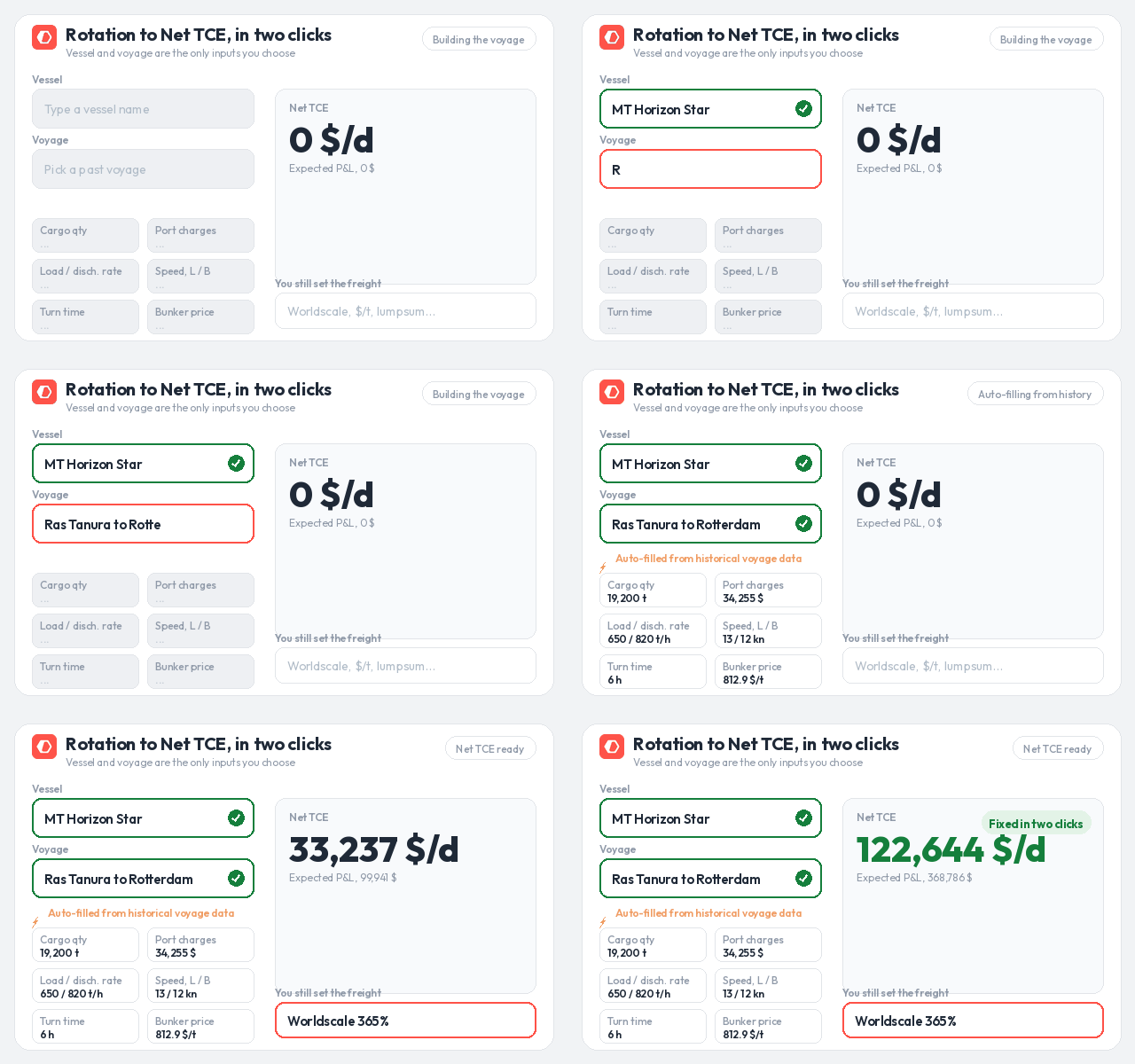
Pre-filled from historical voyage data. Select your vessel and a past voyage, and key inputs fill in for you: cargo quantity, load and discharge rates, turn time, port charges, fuel consumption, speeds and bunker prices. You can override any figure.
Full-voyage economics. The result includes the ballast leg, per-leg fuel cost, and Net TCE. Add a vessel hire rate and commission and you also see Expected P&L.
Costs most calculators miss, included.
- Canal costs for Suez and Panama, calculated from each canal authority’s tariff
- EU ETS cost, using a live EUA price you can overwrite
- Fuel grade by zone, such as MGO inside ECA/SECA and VLSFO outside
- Time and distance exposed to SECA and piracy (HRA) zones, with route avoidance for Suez, Panama, ECA and HRA
Flexible freight basis. Quote in Worldscale, $/t, lumpsum or target TCE, and reference market rates alongside.
Built for the whole workflow. Filter the tonnage list by cargo, region, sanctions, CII and risk status, shortlist the right vessels, and test each one in the calculator. Regional vessel supply and fixtures give you the context to negotiate with facts.
Saved and shared with your team. Save a calculation and share it with your team, so colleagues in any office open the same voyage with the same numbers and nobody rebuilds it.
Who uses a tanker voyage calculator?
- Charterers compare vessel options and check that freight covers costs and compliance exposure.
- Brokers answer “what is this worth?” quickly and counter with numbers.
- Ship owners and operators compare spot voyages against time charter alternatives and protect their margin.
Frequently asked questions
What is the difference between TCE and Net TCE?
TCE is daily earnings after voyage expenses. Net TCE also deducts commissions, so it shows what the owner or operator actually keeps.
Does a voyage calculator include the ballast leg?
A good one does. The repositioning leg adds days, fuel and cost, and leaving it out overstates the result.
Can I include EU ETS and emissions costs in a voyage estimate?
Yes. The Kpler Voyage Calculator works out EU ETS cost automatically using a live EUA price, which you can overwrite.
Does it work for dry bulk, LNG or LPG?
Not at the moment. The cost calculator supports liquids vessels only.
Does it calculate demurrage?
It works out laytime and working days from your terms, but you enter any demurrage cost yourself.
Can my team see the voyages I save?
Yes. You can keep a calculation private or share it with your team. Shared calculations show the creator, and teammates see a view-only copy.
Test the newVoyage Calculator with your own voyage and see the Net TCE in two clicks.
Chartering tankers? Request access to Kpler Tanker today.

See why the most successful traders and shipping experts use Kpler